
If your equipment is all in one place, an audit is easy. You walk the floor, check it against a list, and you are done in an afternoon. Once that equipment is spread across many sites, possibly in different countries, the task changes completely.
Most companies still rely on spreadsheets, manual counts, or internal systems that do not match what is really happening on the ground. A manual count can only cover what the person doing it can physically reach. So the result is often an estimate, not a real audit. RFID has a similar gap. It depends on fixed scanners. The moment an asset moves out of range, visibility disappears. That could be a delivery truck on the road. It could be equipment crossing into a country with no scanner network at all.
Knowing this is broken is not the hard part. Most operations managers already feel it every time a count does not add up. What is harder is knowing exactly what to check, in what order, and how to audit equipment in a way that holds up across many sites instead of just one. That is what this post covers.
Image: Warehouse worker looking for equipment
Table of Contents
A 6-step process to audit equipment across multiple locations manually
- Step 1: Build a Single Asset Register Before You Audit Anything
- Step 2: Classify Assets by Risk Before You Decide How Often to Check Them
- Step 3: Standardise What "Counted" Actually Means
- Step 4: Run the Count With a Fixed Method at Every Site
- Step 5: Reconcile Discrepancies the Same Day You Find Them
- Step 6: Track the Right Numbers Over Time
What Changes When Tracking Technology Replaces Manual Counts

Step 1: Build a Single Asset Register Before You Audit Anything
Before you can audit equipment across multiple sites, you need one list that every site is checked against. This sounds obvious, but it is the step most companies skip. That is why audits across locations go wrong from the start.
Pull together every existing record you have. This includes site spreadsheets, ERP entries, supplier-held inventory, and anything tracked informally. Combine these into a single master list. Give every asset one unique identifier that does not change, no matter which site logs it or what local naming convention that site uses. If two sites currently call the same type of equipment by different names, this is the point where you fix that. Do not wait until the audit itself to sort it out.
This register becomes your baseline. Every count you run afterward gets compared against it, not against whatever each site happens to believe is correct.
Step 2: Classify Assets by Risk Before You Decide How Often to Check Them
Not every asset needs the same audit frequency. Checking everything on the same schedule wastes time on low-risk equipment. It is also not often enough for high-risk equipment.
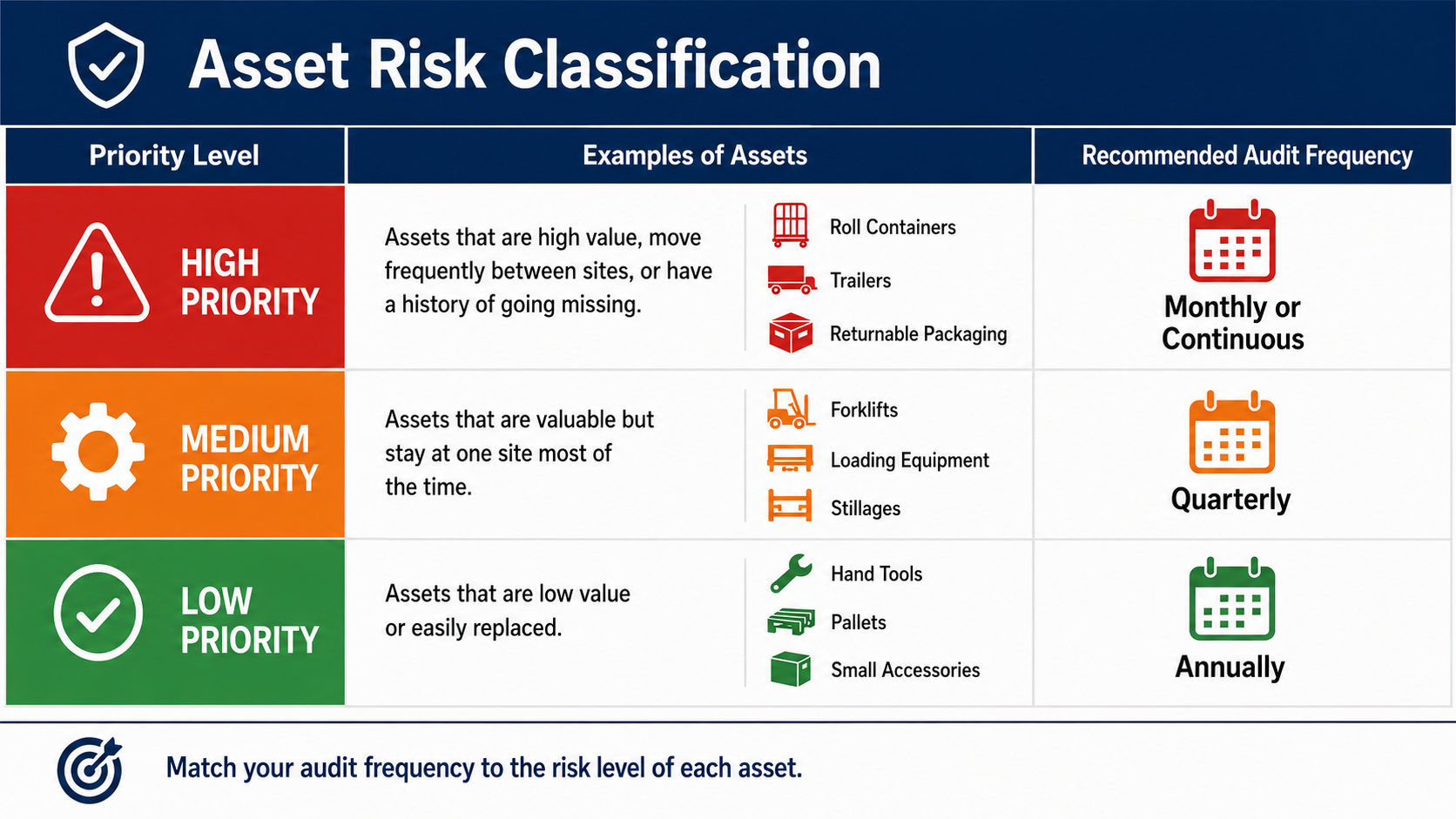
Sort your asset register into three groups. High-risk assets are high value, move frequently between sites or partners, or have a history of going missing. Check these monthly, or continuously if you have the tooling for it. Medium-risk assets are valuable but stay relatively static, like equipment that lives at one site most of the time. A quarterly check is usually enough for these. Low-risk assets are low value or easily replaced. An annual check is typically sufficient.
This classification alone solves a real problem. Most companies either audit everything constantly, which is not sustainable, or audit everything rarely, which leaves high-risk assets unchecked for too long. Matching the frequency to the risk fixes both.
Image: Risk classification chart for high, medium, and low priority assets
Step 3: Standardise What "Counted" Actually Means
This is the step that causes the most damage when skipped. Say one site counts an asset as present if it is anywhere on the property. Another site only counts it as present if it is in active use. Your consolidated numbers will not mean anything, even if every site did their count correctly on its own.
Before you audit equipment across several sites, define a small set of standard statuses. Every site must use these, regardless of local language or internal habits. Useful categories typically include: in use, in storage, in transit, with a partner or supplier, and unaccounted for. Translate these into whatever language each site operates in. Keep the underlying categories identical everywhere. If a site logs in a separate system or local spreadsheet, assign someone to map that site's local terms into your standard categories before the data gets combined.
Without this step, you are not really running one audit. You are running several different audits and hoping they add up to something meaningful.
Step 4: Run the Count With a Fixed Method at Every Site
Once the register and the status categories are in place, the actual count needs to follow the same method everywhere. It should not depend on whatever approach each site manager happens to prefer.
Give every site the same instructions. Tell them which assets to check, what status options to use, and what to do when an asset cannot be located. Set one deadline that applies to every site at the same time. Do not let each site report in on its own schedule, since staggered reporting is exactly how gaps get hidden. Require a simple confirmation from every site, even an empty one. This way, you can tell the difference between a site that checked and found nothing wrong, and a site that simply did not check at all.
Image: Team coordinating a synchronized equipment count across locations

Step 5: Reconcile Discrepancies the Same Day You Find Them
When a count does not match the register, the instinct is often to note it and move on to the next site. This is how small discrepancies turn into permanent unknowns.
Treat every mismatch as something to resolve immediately, not something to revisit later. First, check whether the asset appears at a neighbouring site or in transit records. A large share of "missing" assets turn out to be logged incorrectly rather than actually lost. If an asset genuinely cannot be located, mark it as unaccounted for with the date. Do not leave it ambiguous, so the next audit can tell you whether it reappears or stays missing. Keep a running log of unaccounted-for assets across audits. A pattern, like one site or one route consistently producing losses, tells you far more than any single count does.
Step 6: Track the Right Numbers Over Time
A single audit tells you what is true today. A pattern across audits tells you where your real problems are.
After each audit, track three figures. Your visibility rate is the percentage of registered assets that were successfully located. This should climb toward 100 percent as your process matures. Your time to locate is how long the audit itself took, from start to finish. A shrinking number means your process is genuinely improving, not just feeling more organised. Your unaccounted-for rate is the percentage of assets still missing after reconciliation, broken down by site. This tells you which locations need the most attention.
Review these three numbers after every audit, rather than just fixing the immediate discrepancies. This is what turns an audit from a one-time fire drill into something that actually reduces equipment loss over time. We covered this same problem from a different angle in our post on how to prevent equipment loss.
What Changes When Tracking Technology Replaces Manual Counts
Everything above is a process you can run manually, and many companies do exactly this as a first step. But the same six steps point directly at why manual counts hit a ceiling, no matter how disciplined the process is.
Industrial asset tracking solves Steps 1, 3, and 4 automatically. Every asset already has a unique identifier and a near-real-time status. There is no register to reconcile, and no risk of two sites using different terms for the same thing. Steps 5 and 6 happen continuously instead of only at scheduled audit points. A discrepancy gets flagged the day it happens, not the next time someone walks the site. Step 2 still matters even with tracking in place, since it helps you decide where to focus attention. But it shifts from deciding how often you physically check, to deciding which assets get the most detailed monitoring. For assets where condition matters as much as location, condition monitoring adds another layer. It flags issues automatically, instead of waiting for the next scheduled check.
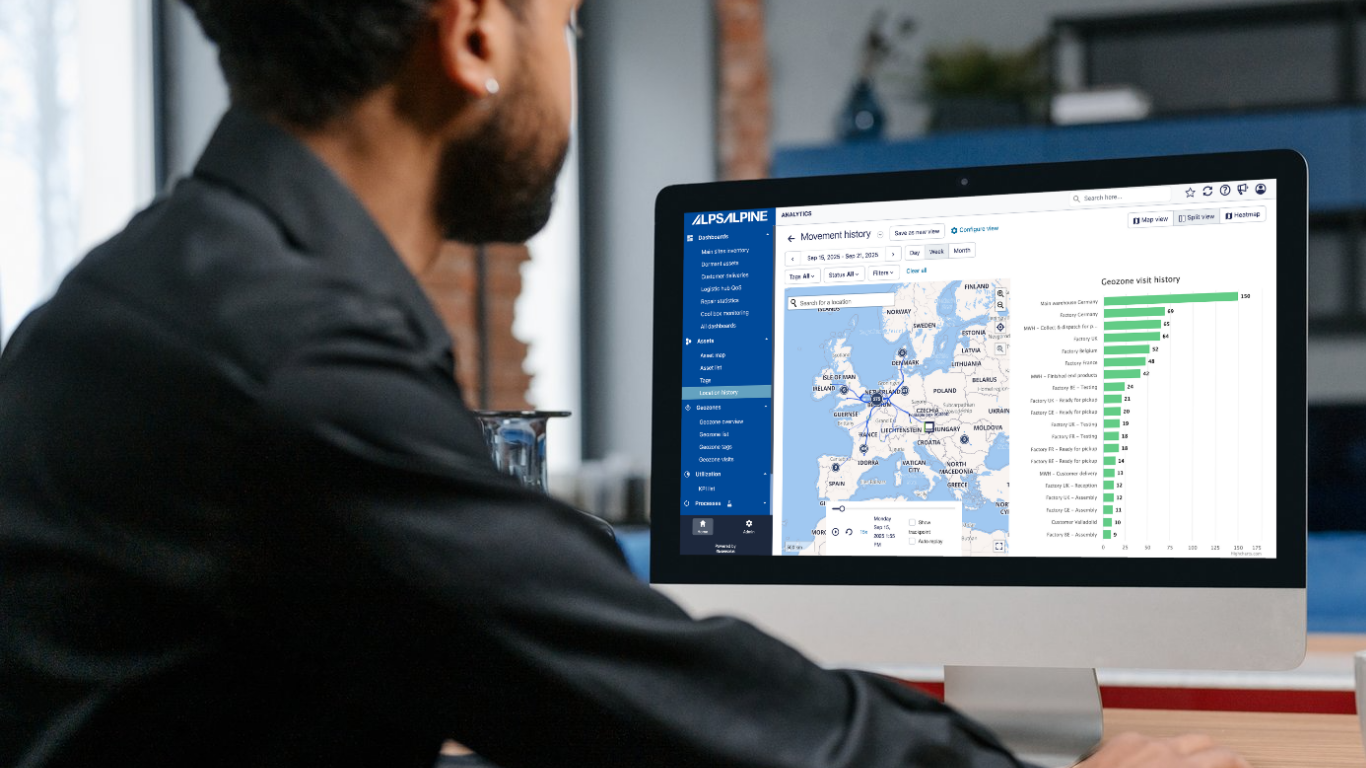
This also changes how reporting works. Instead of someone pulling numbers from each site and building a report by hand, the platform generates it automatically. Visibility rate, unaccounted-for assets by site, and movement history are all available instantly, in one place, without anyone needing to chase data down or stitch it together.
The companies that get the most value from tracking technology are usually the ones who already tried running a disciplined manual process like the one above. They tried it, and hit the same wall: a single source of truth that only updates as fast as the slowest site reports in.
Image: Dashboard tracking visibility rate and unaccounted-for assets over time
Let's Talk About Your Multi-Location Audit
Every company's network looks a little different. The number of sites, the countries involved, the types of equipment, and the partners who handle that equipment all shape what this process should look like for you in practice.
If you are putting together a process to audit equipment across multiple locations and want a second opinion on where the gaps are likely to be, we are happy to talk it through.
Reach out to the Alps Alpine Asset Tracking team and tell us about your locations, your equipment, and where the visibility gaps are. We will take it from there.
Contact us!
Got questions? Book a demo and get the answers you need.
Discover how ALPS ALPINE asset trackers can support your operations, with no pressure or obligation to purchase.
Fill out the form below to connect with our team.
